
Turn signal, high beams, headlamp flasher
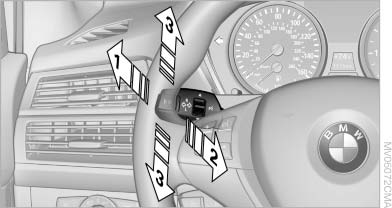
Turn signal, high beams,
headlamp flasher
1. High beams
2. Headlamp flasher
3. Turn signal
See also:
Instrument cluster
At a glance
1 Fuel gauge
2 Speedometer
3 Indicator/warning lamps
4 Tachometer
5 Engine oil temperature
6 Electronic displays
7 Reset miles ...
Indicator/warning lamps
The indicator and warning lamps can light up in
a variety of combinations and colors.
Several of the lamps are checked for proper
functioning and light up temporarily when the
engine is starte ...
Radio ready state
Activate radio ready state:
When the ignition is switched off: press ON/
OFF button on the radio.
When the engine is running: press START/
STOP button.
Some electronic systems/power con ...