
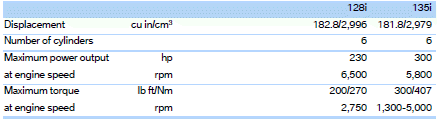
Engine data
See also:
Requirements
▷ BMW Assist is activated.
If BMW Assist is not activated, a mobile
phone that has been recommended by
BMW for TeleService and that is configured
for mobile data communication must be
c ...
Switching off
The system can be deactivated as follows:
▷ Press the button.
▷ Switch off the ignition. ...
Vehicle equipment
All standard, country-specific and optional
equipment that is offered in the model series is
described in this chapter. Therefore, equipment
is also described that is not available in a vehicle,
e ...