
Filtering the message list
The message list can be filtered, when more than one type of message exists.
1. "Filter:"
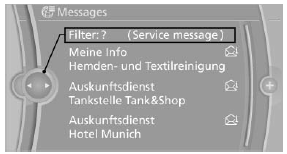
2. Select the type of message.
- "All"
All messages are displayed. - "E-mail"
Only e-mails from the mobile phone are displayed. - "Service message"
Only messages from the BMW Assist Concierge service, My Info and BMW Info are displayed. - "Text message"
Only text messages from the mobile phone are displayed.
See also:
Braking safely
Your vehicle is equipped with ABS as a standard
feature.
Applying the brakes fully is the most effective
way of braking in situations when this is necessary.
The vehicle maintains steering respo ...
Reassigning individual programs
1. Switch on the ignition.
2. Hold the hand-held transmitter a distance of
approx. 1 to 3 in/2.5 to 8 cm from the memory
buttons.
The required distance depends on the
manual transmitter.
3. H ...
General information
The sound settings are stored for the remote
control currently in use. ...