
Heated seats
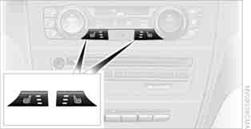
Press the button once per temperature level. Three LEDs indicate the highest temperature.
To switch off:
Press button longer.
If you continue driving within approx. the next 15 minutes, the seat heating is automatically activated at the previously set temperature.
The temperature is lowered or the heating is switched off entirely to save on battery power. The LEDs stay lit.
See also:
Vehicle equipment
All standard, country-specific and optional
equipment that is offered in the model series is
described in this chapter. Therefore, equipment
is also described that is not available in a vehicle, ...
Storing
1. Switch on the ignition.
2. Set the desired position.
3. Press the button. The LED in
the
button lights up.
4. Press the desired button 1 or 2. The LED
goes out.
If the M button is presse ...
Avoiding unintentional alarms
The tilt alarm sensor and interior motion sensor
can be switched off together, such as in the following
situations:
▷ In duplex garages.
▷ During transport on car-carrying trains, at ...