
Calling up information on the info display
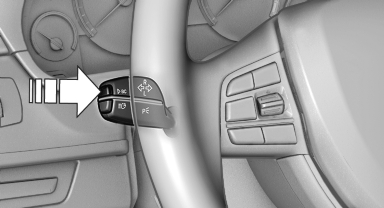
Calling up information on the info
display
Press the computer button on the turn signal lever.
Information is displayed on the info display of the instrument cluster.
See also:
Exterior
The exterior remains the same for 2009, and the X3 retains its awkward
angles, disjointed taillights and odd lower bodywork. It's not unattractive, but
it sure isn't as stylish as Mercedes' new GL ...
BMW X6: rear seats
The head restraints in the rear cannot be adjusted
and cannot be removed. ...
Driving through water
Maximum water depth:
▷ BMW X5: 20 inches/50 cm.
▷ BMW X6: 17 inches/45 cm.
Adhere to water depth and speed limitations
Only drive through water up to the above-mentioned
depth at n ...