
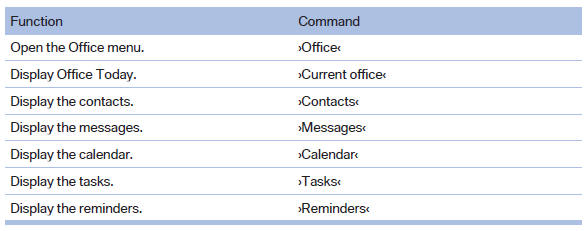
Office
See also:
Vehicle equipment
All standard, country-specific and optional
equipment that is offered in the model series is
described in this chapter. Therefore, equipment
is also described that is not available in a vehicle,
e ...
System limits
Personal responsibility
The high-beam assistant cannot serve as
a substitute for the driver's personal judgment
of when to use the high beams. Therefore, manually
switch off the high beams in ...
Automatic climate control
Automatic climate control
1 Seat heating, left
2 Vent settings
3 Rear window defroster
4 Air flow
5 AUTO program
6 Temperature
7 Seat heating, right
8 Cooling function
9 Recirculated-air mo ...