
Screens
Adjusting
 Danger of burns when screen is folded out
Do not reach behind the screen; otherwise, there is the danger of getting burned. The back of the screen can become very hot.
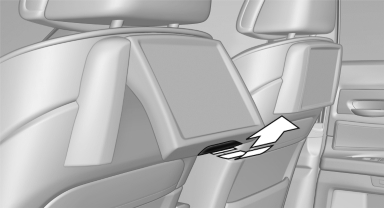
- To fold out: pull at the bottom edge.
- To fold in: press against the bottom edge.
Notes
- Do not cover lower screen edge, since this is where the sensors and the infrared interface are installed.
- When loading the rear seats and adjusting the backrest of the front seat, fold in the screens.
- When cleaning the screen, follow the care instructions.
See also:
Cameras
The objectives of the Top View cameras are located
at the bottom of the exterior mirror housings.
The image quality may be impaired by dirt.
Clean the lens ...
Parking lamps/low beams,
headlamp control
General information
If the driver door is opened with the ignition
switched off, the exterior lighting is automatically
switched off at the following switch settings:
0, ,
Parking lamps
Swit ...
Switching on wipers
Press the wiper lever upward, arrow 1.
The lever automatically returns to its initial position
when released.
Normal wiper speed
Press up once.
The system switches to operation in the intermitte ...