
Rear CD/DVD player
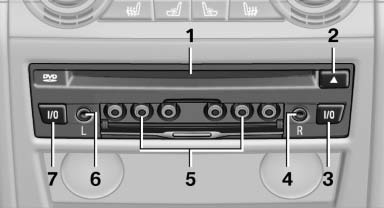
1 CD/DVD slot
2 Eject CD/DVD
3 On/off, right
4 Headphone connection, right
5 RCA sockets
6 Headphone connection, left
7 On/off, left
See also:
Controls
Controls
1. Control Display
2. Controller with buttons
The buttons can be used to open the menus
directly. The controller can be used to select
menu items and create the settings.
The button ...
Safety belts
Observe the adjustment instructions on page
45 to ensure the best possible personal protection.
Before every drive, make sure that all occupants wear their safety belts. Airbags
complement the s ...
Warning stages
Prewarning
This warning is issued, for example, when there
is the impending danger of a collision or the distance
to the vehicle ahead is too small.
Acute warning
Warning of the imminent danger ...