
Controls
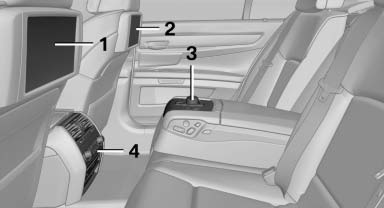
1 Screen, left
2 Screen, right
3 Controller with buttons
4 CD/DVD player
See also:
BMW Maintenance System
The maintenance system directs you to required
maintenance measures and thereby supports
you in maintaining road safety and the operational
reliability of the vehicle. ...
System limits
Personal responsibility
The system cannot serve as a substitute
for the driver's personal judgment of the traffic
situation.
In the event of a warning, do not jerk the steering
wheel, as ...
Following the initial pairing
▷ The mobile phone is detected/connected in
the vehicle within a short period of time
when the engine is running or the ignition is
switched on.
▷ After they have been identified, p ...