
Replacing the batteries
 No rechargeable batteries
Do not use rechargeable batteries, as damage may result from the substances in the batteries.
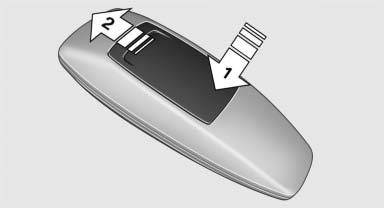
1. Remove the cover. Press on the cover, arrow 1, and push forward, arrow 2.
2. Insert batteries of the same type.
3. Close the cover.
 Take the used battery to a recycling center
or to your service center.
Take the used battery to a recycling center
or to your service center.
See also:
Contacts
Note
If equipped with full mobile phone preparation
package.
At a glance
Contacts can be created and edited. The contacts
from the mobile phone are displayed as
well if this function is supporte ...
Selection lists in theinstrument cluster
The concept
The following can be operated using the buttons
and the thumbwheel on the steering wheel and
the display in the instrument cluster:
► Current audio source.
► Redial on t ...
Operating BMW Online
To start a search:
▷ Turn the controller to highlight an element.
▷ Press the controller to display an element.
Opening the start page
1. Open "Options".
2. "Display st ...