
Adjusting
 Danger of burns when screen is folded out
Do not reach behind the screen; otherwise, there is the danger of getting burned. The back of the screen can become very hot.
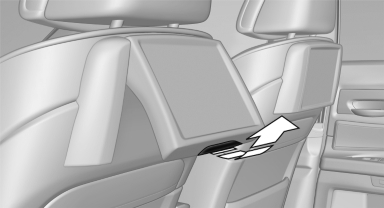
- To fold out: pull at the bottom edge.
- To fold in: press against the bottom edge.
See also:
Text messages
Calling the sender of a text message
1. Select the desired message.
2. Select the symbol.
Saving the sender in the contacts
1. Highlight the desired message.
2. Open "Options".
3. &quo ...
Map view
Selecting the map view
1. "Navigation"
2. "Map" ...
Glove compartment
Front passenger side
Opening
Pull the handle.
The light in the glove compartment switches on.
Close the glove compartment again immediately
Close the glove compartment immediately after
use ...