
Replacing the batteries
 No rechargeable batteries
Do not use rechargeable batteries, as damage may result from the substances in the batteries.
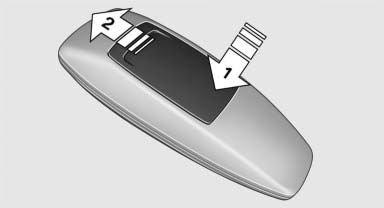
1. Remove the cover. Press on the cover, arrow 1, and push forward, arrow 2.
2. Insert batteries of the same type.
3. Close the cover.
 Take the used battery to a recycling center
or to your service center.
Take the used battery to a recycling center
or to your service center.
See also:
Deactivating the system
▷ Press the lever upward or downward twice,
arrow 3.
▷ Switch off the ignition.
The stored speed is cleared. ...
System limits
Personal responsibility
The high-beam assistant cannot serve as
a substitute for the driver's personal judgment
of when to use the high beams. Therefore, manually
switch off the high beams in ...
Unpairing a device
1. "Telephone"
2. "Bluetooth® (phone)"
3. Highlight the device that is to be unpaired.
4. Open "Options".
5. "Remove phone from list"
Unpairing a device ...