
Playback
Filling the CD/DVD* player
Insert the CD/DVD with the printed side up. Playback begins automatically.
Reading can take a few minutes with compressed audio files.
Starting playback
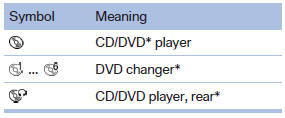
A CD/DVD is located in the CD/DVD player or DVD changer*.
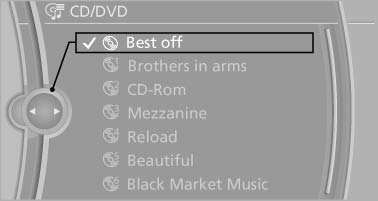
1. "CD/Multimedia"
2. "CD/DVD"
3. Select the desired CD or DVD.
Playable formats
- DVD: DVD-ROM, DVD-R, DVD+R, DVDRW, DVD+RW, DVD-R DL, DVD+R DL, DVD audio (video part only), DVD video*.
- CD: CD-ROM, CD-R, CD-RW, CD-DA, VCD*, SVCD*.
- Compressed audio files: MP3, WMA, AAC*, M4A*.
See also:
Controls
1. Change entertainment sources
2. Change station/track
3. Programmable memory buttons
4. Volume, on/off
5. Change wave band ...
Automatic climate control
Automatic climate control
1 Seat heating, left
2 Vent settings
3 Rear window defroster
4 Air flow
5 AUTO program
6 Temperature
7 Seat heating, right
8 Cooling function
9 Recirculated-air mo ...
Entering a street or intersection
separately
Enter a street and intersection in the same way
as you would enter a town/city. ...