
Controls
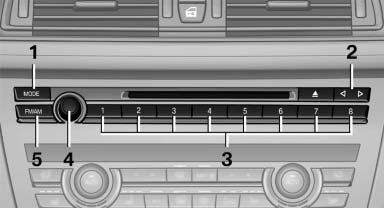
1 Change entertainment sources
2 Change station/track
3 Programmable memory buttons
4 Volume, on/off
5 Change wave band
See also:
Settings for the map view
The settings are stored for the remote control
currently in use.
1. "Navigation"
2. "Map"
3. Open "Options".
4. "Settings"
Set the map view.
"Da ...
Switching off automatically
System switches off: above approx. 9 mph/
15 km/h.
Switch on the system again if necessary. ...
General driving notes
Closing the trunk lid
Drive with the trunk lid closed
Only drive with the tailgate closed; otherwise,
in the event of an accident or braking or
evasive maneuvers, passengers or other road
use ...