
Warning of people in danger
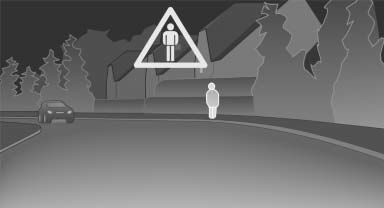
If the system detects a person in the defined area in front of the vehicle and if there is the danger of a collision with this person, a warning symbol appears in the Control Display and Head-up Display*.
Although both the shape and the heat radiation are analyzed, false warnings cannot be ruled out.
Warning area in front of the vehicle
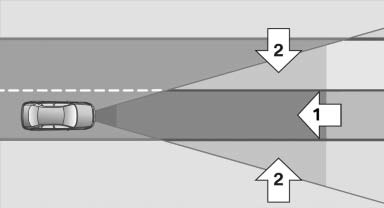
The warning area in front of the vehicle is divided into two areas.
- Central area 1 directly in front of the vehicle.
- Expanded area 2 to the right and left.
The entire area moves along with the vehicle in the direction of the steering angle and changes with the vehicle speed. As the vehicle speed increases, the area becomes longer and wider, for example.
Symbols
 This symbol is displayed when a
person
is detected in the central area, arrow 1,
immediately in front of the vehicle.
This symbol is displayed when a
person
is detected in the central area, arrow 1,
immediately in front of the vehicle.
 This symbol is displayed when a
person
detected in the extended area, arrow 2,
is moving from the right or left to the central area.
This symbol is displayed when a
person
detected in the extended area, arrow 2,
is moving from the right or left to the central area.
Display in the Head-up Display
 The warning is simultaneously
displayed
in the Head-up Display and in the
Control Display. The displayed symbol
can vary with the people detected. For people
located in the central area, the distance to the
person is indicated by the size of the symbol.
The warning is simultaneously
displayed
in the Head-up Display and in the
Control Display. The displayed symbol
can vary with the people detected. For people
located in the central area, the distance to the
person is indicated by the size of the symbol.
See also:
Mounting LATCH child restraint fixing systems
1. Mount the child restraint fixing system; refer
to the operating instructions of the system.
2. Ensure that both LATCH anchors are properly
connected. ...
Open trunk lid with no-touch activation
With Comfort Access, the trunk lid can be
opened with no-touch activation using the remote
control you are carrying.
A sensor detects a directed foot motion in the
center of the area at the rea ...
System limits
Personal responsibility
The system cannot serve as a substitute
for the driver's personal judgment of the course
of the road and the traffic situation.
In the event of a warning, do not jerk th ...