
Opening/closing the sliding visor
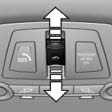
- Press the switch in the desired direction to the resistance point and hold it there. The sliding visor moves while the switch is being held.
- Press the switch in the desired direction past the resistance point. The sliding visor moves automatically. Pressing the switch again stops the motion.
See also:
Vehicle equipment
All standard, country-specific and optional
equipment that is offered in the model series is
described in this chapter. Therefore, equipment
is also described that is not available in a vehicle,
e ...
Braking safely
Your vehicle is equipped with ABS as a standard
feature.
Applying the brakes fully is the most effective
way of braking in situations when this is necessary.
The vehicle maintains steering respo ...
Display on the Control Display
Display the computer or trip computer on the
Control Display.
1. "Vehicle Info"
2. "Onboard info" or "Trip computer"
Resetting the fuel consumption or
speed
1. &q ...