
Integrated key
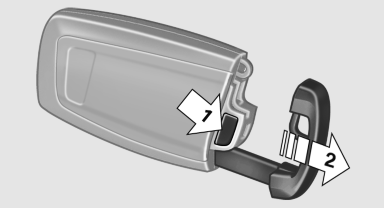
Press the button on the back of the remote control, arrow 1, and pull out the key, arrow 2.
The integrated key fits the following locks:
► Driver's door.
► Glove compartment on the front passenger
side.
See also:
Customer Relations
At a glance
Contact Customer Relations for information on
all aspects of your vehicle.
Calling Customer Relations
Vehicles not equipped with BMW
Assist or TeleService
1. "BMW Assist" ...
Display in the instrument cluster
The selected speed is displayed
in the speedometer.
Green: the system is actively
braking the vehicle.
Orange: the system is on
standby.
...
Address book
Selecting a destination from the
address book
1. "Navigation".
2. "Address book".
Contacts with addresses are displayed if
these have been checked as destinations.
If the m ...