
Service Request
At a glance
Sends information to your service partner to request the arrangement of a service appointment.
The TeleService data is transmitted during a Service Request. If possible, your service partner will establish contact with you.
Starting a Service Request
1. "BMW Assist" or "ConnectedDrive"
2. "Service Request"
3. "Start service"
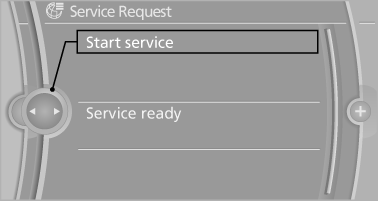
A Service Request can be started via a Check Control message
See also:
Managing music
Albums
Renaming an album
The name of the album, if available, is automatically
entered when the album is stored. If the
name is not available, it can be changed later if
desired.
1. "CD/ ...
Service and Warranty Information Booklet for US models and Warranty and
Service Guide Booklet for Canadian models
Please consult your Service and Warranty Information
Booklet for US models and Warranty and
Service Guide Booklet for Canadian models for
additional information on service requirements.
Mainten ...
Three different drive modes
There are three different modes that the transmission works under: Drive,
Sport or Manual. Sport mode provides a more aggressive shifting, holding gears
longer and letting you stay in the engine's ...