
Controls
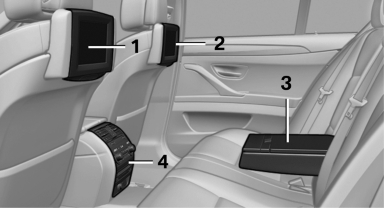
1 Screen, left
2 Screen, right
3 Center armrest, remote control
4 CD/DVD player
See also:
Putting into operation after a power failure
Putting the parking brake into operation
The parking brake should only be put into
operation again if it was manually released due
to an interruption in the supply of electrical
power. Otherw ...
High-beam Assistant
When the lights are switched on, this system
automatically switches the high beams on and
off. The procedure is controlled by a sensor on the front of the interior
rearview mirror. The assistant ...
In the glove compartment
Push the handle up, arrow 1, and open the lid,
arrow 2. ...