
Controls
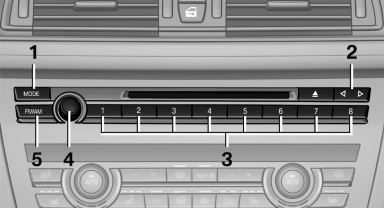
1. Change entertainment sources
2. Change station/track
3. Programmable memory buttons
4. Volume, on/off
5. Change wave band
See also:
Warning of people in danger
If the system detects a person in the defined
area in front of the vehicle and if there is the danger
of a collision with this person, a warning
symbol appears in the Control Display and
Hea ...
Display of special destinations
List of special destinations: special destinations
are arranged by distance and appear with a directional
arrow pointing to the special destination.
On the split screen, special destinations of t ...
Roadside Assistance
Service availability
Roadside Assistance can be reached around the
clock in many countries. You can obtain assistance
there in the event of a vehicle breakdown.
Roadside Assistance
The Roadside ...