
At a glance
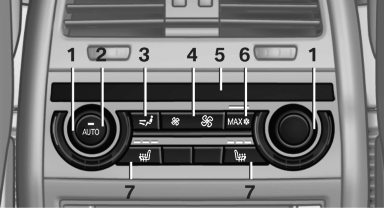
1. Temperature
2. AUTO program
3. Vent settings
4. Air volume, AUTO intensity
5. Display
6. Maximum cooling
7. Seat heating
See also:
Units of measure
To set the respective units of measure, miles or
km for the odometer and ℃ or ℉ for the external
temperature.
The setting is stored for the remote control currently
in use. ...
Signaling a turn
Press the lever beyond the resistance point.
To switch off manually, press the lever to the resistance
point.
Unusually rapid flashing of the indicator lamp indicates
that a turn signal bulb has ...
Status display
The current status of the Tire Pressure Monitor
TPM can be displayed on the Control Display,
e.g., whether or not the TPM is active.
1. "Vehicle Info"
2. "Vehicle status"
3. ...