
Front ventilation
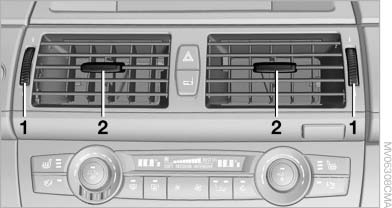
Front ventilation
1. Use the thumbwheels to smoothly open and close the air vents
2. Use the lever to change the direction of the air flow
 Avoiding injury
Do not drop any foreign objects into the air
vents, otherwise these could be catapulted outwards
and lead to injuries.◀
Ventilation for cooling
Adjust the vents to direct the flow of cool air in your direction, for instance if the interior has become too warm.
Draft-free ventilation
Set the air vents so that the air flows past you and is not directed straight at you.
See also:
Malfunction
Malfunction
A Check Control message , is
displayed in the instrument cluster.
The areas in front of and behind the vehicle appear
in shaded form on the Control Display. PDC
has failed. Hav ...
Using contact data
At a glance
Contact data from appointments, tasks, text
messages, emails and notes can be stored or
selected.
Displaying contact or selecting phone
number
1. "Use contact data".
2. ...
TeleService Report
Transmits technical data that is evaluated for the
ongoing development of BMW products from
your vehicle to BMW in regular intervals if necessary.
TeleService Report is activated in vehicles that ...