
Adjusting the height
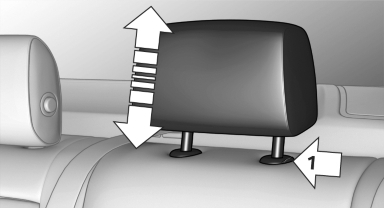
▷ To raise: pull.
▷ To lower: press the button, arrow 1, and
push the head restraint down.
See also:
Entering a house number separately
Depending on the data in the navigation system,
house numbers up to number 2,000 can be entered.
1. ›House number‹
2. Say the house number.
Say each digit separately.
3. Continue making the entr ...
At a glance
This overview of buttons, switches and displays is intended to familiarize you
with your vehicle's operating environment. The section will also assist you in becoming
acquainted with the contr ...
Switching the high beams on and offmanually
► High beams on, arrow 1.
► High beams off/headlamp flasher, arrow 2.
The High-beam Assistant can be switched off
when manually adjusting the light. To reactivate
the High-beam Assis ...