
Buttons on the remote control
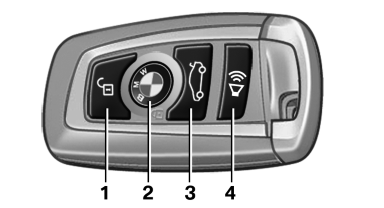
Buttons on the remote control
1. Unlocking
2. Locking
3. Trunk lid
4. Panic mode, headlamp courtesy delay feature
See also:
Radio
When the same radio source is selected in the
front and rear (e.g., FM/AM), the same radio station
is played.
Operation is the same as for the front radio. ...
Warning triangle
The warning triangle is located in the container
on the inside of the trunk lid.
Unscrew the wing nut to open. ...
Following the initial pairing
▷ The mobile phone is detected/connected in
the vehicle within a short period of time
when the engine is running or the ignition is
switched on.
▷ After they have been identified, p ...