
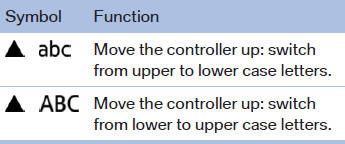
Switching between upper and lower case letters
Depending on the menu, you can switch between entering upper and lower case letters:
See also:
Vehicle equipment
All standard, country-specific and optional
equipment that is offered in the model series is
described in this chapter. Therefore, equipment
is also described that is not available in a vehicle, ...
Configuring cell phone
Additional functions can be activated or deactivated
for paired and connected mobile phones.
1. "Telephone".
2. "Bluetooth® (phone)".
3. Highlight the mobile phone to be confi ...
Repeating a spoken instruction
1. "Navigation"
2. "Map"
3. Highlight the
symbol.
4. Press the controller twice. ...