
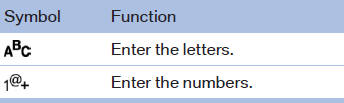
Switching between letters and numbers
Depending on the menu, you can switch between entering letters and numbers:
See also:
Context help - Owner's
Manual to the temporarily
selected function
The relevant information can be opened directly.
Opening during operation via iDrive
To move directly from the application on the
Control Display to the options menu:
1. Press the button or move ...
The concept
If the vehicle is equipped with Active Cruise
Control with Stop & Go, the collision warning is
controlled via the cruise control radar sensor.
The system issues a two-phase warning of a
dan ...
Malfunction
Comfort Access may not function properly if it
experiences interference from external sources
such as mobile phones, metal objects, overhead
power lines, transmission towers, etc.
In this case, ...