
All around the center console
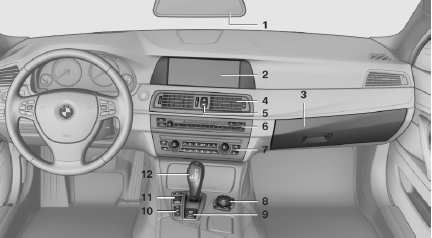
All around the center console
1. Headliner
2. Control Display
3. Glove compartment
4. Air vent
5.  Hazard warning system
 Central locking system
6. Radio
CD/Multimedia
7. Automatic climate control
8. Controller with buttons
9.  Parking brake
 Auto Hold
10. PDC Park Distance Control
Top View
Backup camera
Parking assistant
 Side View
 HDC Hill Descent Control
11.  Dynamic Driving Control
 DSC Dynamic Stability Control
12. Transmission selector lever
See also:
Configuring the devices
Additional functions can be activated or deactivated
for paired and connected devices.
1. "Telephone"
2. "Bluetooth® (phone)"
3. Highlight the device to be configured.
4. Ope ...
Voice operation
Vehicles equipped with the voice activation system:
operation
Vehicles not equipped with the voice activation
system: depending on the equipment, the mobile
phone can be voice operated as descri ...
Issuing a warning
If the vehicle begins leaving the lane and a lane
marking has been detected, the steering wheel
begins vibrating.
If the turn signal is set before the lane is
changed, a warning is not issued.
...