
CD/Multimedia
CD/DVD drive
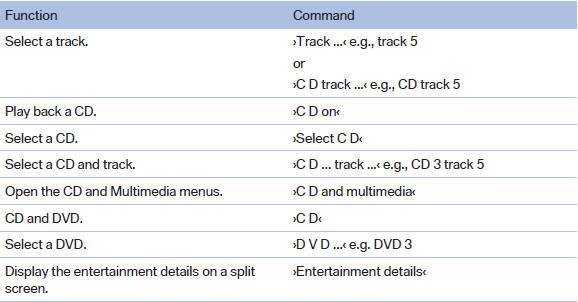
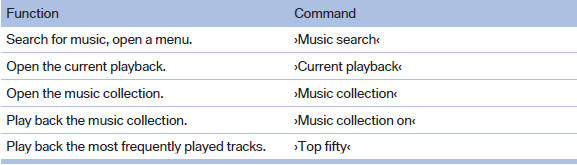
Music collection
External devices

Tone

See also:
Entering a destination manually
To make it easier to enter town/city names and street names, the system assists
you with automatic name completion and entry comparison. This makes it possible
to enter different spellings and com ...
The M Formula
Following the M car formula, the 1M features increased power, a manual
transmission, rear-wheel drive, a modified suspension, fat tires and a
distinctive look — perhaps more distinctive than the o ...
System limits
Check the traffic situation as well
Check the traffic situation around the vehicle
with your own eyes. Otherwise, an accident
could result from road users or objects located
outside the pictur ...