
Operating the programs
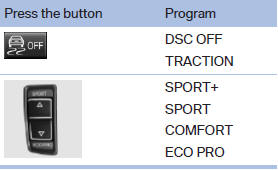
Automatic program change
The system automatically switches to COMFORT in the following situations:
▷ Failure of DSC Dynamic Damping Control.
▷ The vehicle has a flat tire.
▷ When activating cruise control in TRACTION or DSC OFF mode.
See also:
Windshield washer nozzles
The washer jets are automatically heated whenever
the ignition is switched on. ...
Start/Stop button
The concept
Pressing the Start/Stop button
switches the ignition on or off and
starts the engine.
The engine starts if the brake
pedal is pressed when you press
the Start/Stop button. ...
Automatic locking
The setting is stored for the remote control currently
in use.
1. "Settings"
2. "Door locks"
3. Select the desired function:
► "Lock if no door is opened"
T ...