
Changing the list view
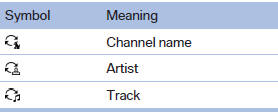
The list view changes every time the first symbol on the navigation bar is pressed.
Information on the channel is displayed.
See also:
BMW Parking Assistant takes charge of manoeuvring into parking spaces
The BMW Parking Assistant is another comfort-enhancing driver assistance
system from BMW ConnectedDrive to be included in the new BMW 3-Series Sedan. The
new system helps the driver to manoeuvre s ...
Phone book
Displays
The phone book accesses the contacts and
shows all contacts for which a phone number
has been stored. The entries can be selected to
make a call.
1. "Telephone"
2. "Ph ...
Changing batteries
Changing batteries
1. Press the detent and remove the cover.
2. Change the batteries. The type and installation
position are marked on the bottom of
the battery compartment.
3. Close the cove ...