
Navigation bar overview
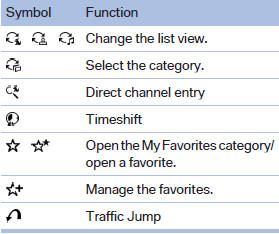
With navigation system: the functions of the navigation bar symbols can also be stored on the programmable memory buttons.
They are stored.
See also:
Remove attached parts
following use
Remove auxiliary mirrors, roof or rear luggage
racks which are no longer required following
use.
Attached parts on the vehicle impair the aerodynamics
and increase the fuel consumption. ...
General information
Overloading the vehicle
To avoid exceeding the approved carrying
capacity of the tires, never overload the vehicle.
Overloading can lead to overheating and increases
the rate at which damage deve ...
Voice operation
Vehicles equipped with the voice activation system:
operation.
Vehicles not equipped with the voice activation
system: depending on the equipment, the mobile
phone can be voice operated as desc ...