
RDS
RDS broadcasts additional information, such as the station name, in the FM wave band.
Switching the RDS on/off
1. "Radio".
2. "FM".
3. "Options" Open.
4. "RDS"
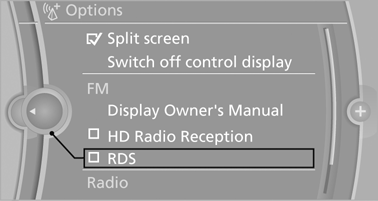
The setting is stored for the remote control currently in use.
See also:
Data transfer
During the updating of BMW services, display
the status of the data transfer.
1. "BMW Assist" or "ConnectedDrive".
2. "Options" Open.
3. "Data transfer" ...
Detailed information on service
requirements
More information on the scope of service required
can be displayed on the Control Display.
1. "Vehicle Info"
2. "Vehicle status"
3. "Service required"
Required mai ...
Selecting the map view
1. "Navigation"
2. "Map" ...