
Current fuel consumption
Instrument cluster

Displays the current fuel consumption.
You can check whether you are currently driving in an efficient and environmentally- friendly manner.
Instrument cluster with enhanced features
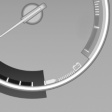
Displays the current fuel consumption.
You can check whether you are currently driving in an efficient and environmentally- friendly manner.
Displaying the current fuel consumption
1. "Settings"
2. "Info display"
3. "Additional indicators"
The bar display for the current fuel consumption is displayed in the instrument cluster.
See also:
Interior lamps
The interior lamps, the footwell lamps, entry lamps, cargo area
lamp and courtesy lampsare controlled automatically.
The LEDs for the courtesy lamps are set in the door handles and illuminate the
...
Displays in the instrument cluster
1 Display of desired speed
2 Distance to vehicle ahead of you
3 Vehicle symbol
4 Brief status display
Desired speed
Marking in the speedometer
The marking lights up in
green: the syste ...
USB audio interface/mobile phone
audio interface
At a glance
It is possible to connect external audio devices.
They can be operated via iDrive. The sound is
output on the vehicle loudspeakers
Connectors for external devices
▷ Connection ...