
Replacing the battery
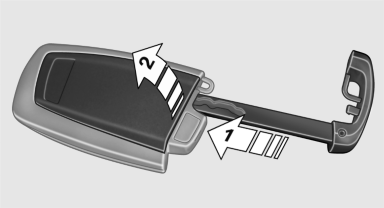
Replacing the battery
1. Take the integrated key out of the remote control.
2. Push in the catch with the key, arrow 1.
3. Remove the cover of the battery compartment; see arrow 2.
4. Insert a battery of the same type with the positive side facing upwards.
5. Press the cover closed.
 Take the used battery to a
recycling center
or to your service center.
Take the used battery to a
recycling center
or to your service center.
See also:
Avoiding unintentional alarms
The tilt alarm sensor and interior motion sensor
can be switched off together, such as in the following
situations:
▷ In automatic car washes.
▷ In duplex garages.
▷ During tr ...
Adaptive Drive
The concept
Adaptive Drive includes the following systems:
▷ Dynamic Drive
▷ Dynamic Damping Control
The system increases driving stability and driving
comfort. ...
General information
Your vehicle contains advanced technology for
the reduction of fuel consumption and emissions.
Fuel consumption depends on a number of different
factors.
The implementation of certain measures, ...