
Controls
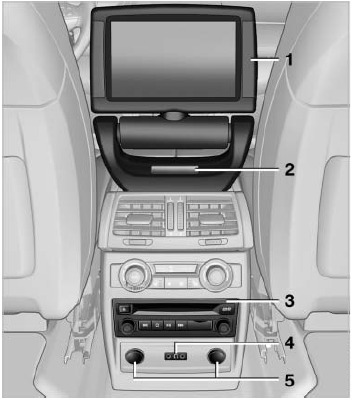
Controls
1 Display screen
2 Infrared interface for headphones
3 CD/DVD player
4 Headphone connection: jack plug
5 12 V sockets
See also:
Playing music
Music searchAll tracks for which additional information has been stored can be accessed by
the music search. Tracks without additional information can be called up via the
corresponding album.
1. ...
Seats with safety belt
The vehicle has five seats, each of which is
equipped with a safety belt. ...
Adaptive fixing system
The adaptive fixing system is used to divide up
the cargo area. It consists of two brackets with
a telescopic rail and retaining straps. These are
guided into the two rails on the cargo area flo ...