
Selecting the destination
1. "Navigation"
2. "Map"
The current position of the vehicle is displayed on the map.
3.  "Interactive
map"
"Interactive
map"
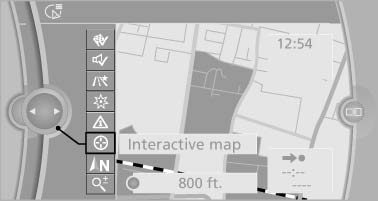
Interactive map
4. Select the destination with crosshairs.
▷ To change the scale: turn the controller.
▷ To shift the map: move the controller in
the required direction.
▷ To shift the map diagonally: move the
controller in the required direction and
turn it.
See also:
Starting the engine
The engine starts automatically under the following
conditions:
▷ Manual transmission:
The clutch pedal is pressed.
▷ Automatic transmission:
By releasing the brake pedal.
When Auto ...
Vehicle equipment
This Owner's Manual describes all models and
all standard, country-specific and optional
equipment that is offered in the model series.
Therefore, in this Owner's Manual, equipment is
also desc ...
Opening/closing the sliding visor
▷ Press the switch in the
desired
direction to the resistance
point and hold it there.
The sliding visor moves while
the switch is being held.
▷ Press the switch in the desired ...