
Street does not exist in the destination city/town
The desired street does not exist in the specified city/town because it belongs to another part of the city/town.
1. "Navigation"
2. "Enter address"
3. Select "Street" or the displayed street.
4. Change to the list of street names.
5. Select "In" with the state/province currently displayed.
All streets of the selected state/province are offered. The associated town/city is displayed after the street name.
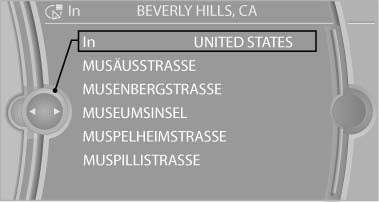
Select "In" with the state/province currently
displayed
6. Select the letters.
7. Change to the list of street names.
8. Highlight the street.
9. Select the street.
See also:
Requirements
▷ Subscription to the optional Convenience
Plan.
▷ The date setting on the Control Display is
current.
▷ The vehicle is located within wireless network
coverage. ...
Tire damage
General information
Inspect your tires often for damage, foreign objects
lodged in the tread, and tread wear.
Notes
Indications of tire damage or other vehicle defects:
Unusual vibrations dur ...
Notes
Manufacturer's information for child restraint
fixing systems
To select, mount and use child restraint fixing
systems, observe the information provided by
the system manufacturer; otherwise, t ...