
Entering a town/city
1. Select "Town/City/Postal Code" or the displayed town/city.
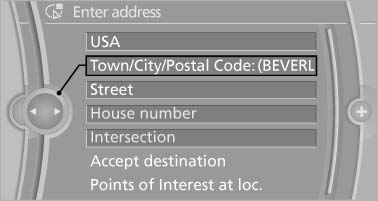
Town/City/Postal Code
2. Select letters, if necessary.
The list is narrowed down further with each entry.
3. Move the controller to the right.
4. Select the name of the town/city from the list.
If there are several towns/cities with the same name:
1. Change to the list of town/city names.
2. Highlight the town/city.
3. Select the town/city.
See also:
Fuel
Vehicle equipment
All standard, country-specific and optional
equipment that is offered in the model series is
described in this chapter. Therefore, equipment
is also described that is not avai ...
The concept
Adaptive Drive reduces the body roll which occurs
when cornering quickly or during fast evasive
maneuvers. In addition, Adaptive Drive reduces
the steering angle requirement, improves
the runn ...
New trip
A trip can be planned with several intermediate
destinations.
1. "Navigation"
2. "Map"
3. Move the controller to the left if necessary.
4. "Guidance"
5. "Ente ...