
Digital compass
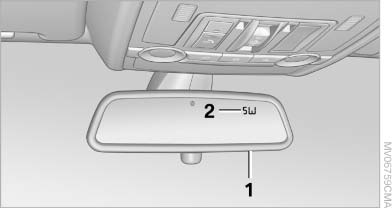
Digital compass
1. Adjustment button
2. Display
The display shows you the main or secondary compass direction in which you are driving.
See also:
Adjusting
General information
Do not adjust the seat while driving
Never attempt to adjust the driver's seat
while driving.
The seat could respond with unexpected movement
and the ensuing loss of vehicl ...
Calling up settings
Do not retrieve the memory while driving
Do not retrieve the memory setting while
driving, as an unexpected movement of the seat
or steering wheel could result in an accident.◀
Comfort fu ...
Vehicle equipment
All standard, country-specific and optional
equipment that is offered in the model series is
described in this chapter. Therefore, equipment
is also described that is not available in a vehicle,
e ...