
Setting compass zones
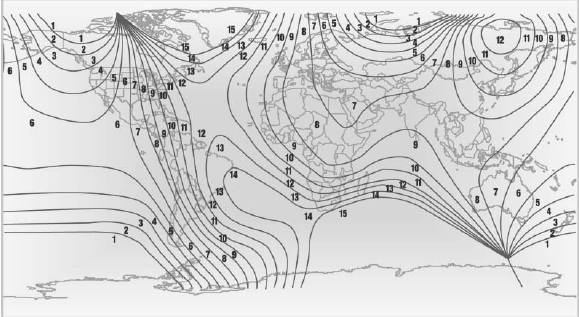
Set the compass zone corresponding to the vehicle's geographic location so that the compass
Setting compass zones
Press the adjustment button for 3‑4 seconds.
The number of the compass zone set is shown in the display.
To change the zone setting, briefly press the adjustment button repeatedly until the display shows the number of the compass zone corresponding to the current location. can function correctly; refer to the world map with compass zones.
The compass is operational again after approx.
10 seconds.
See also:
Central locking system
The concept
The central locking system becomes active
when the driver's door is closed.
The system simultaneously engages and releases
the locks on the following:
Doors.
Trunk lid.
Fuel ...
Pairing and connecting
Pairing the mobile phone
To avoid becoming distracted and posing
an unnecessary hazard both to your own vehicle's
occupants and to other road users, only
pair the mobile phone while the vehicl ...
Malfunctions
Steering wheel vibration
Frequent activation of the steering wheel vibration
causes the system to overheat.
This causes Active Blind Spot Detection to become
deactivated.
Let the system cool an ...