
Increasing or reducing speed
The speed can be changed in the range from approx. 4 mph/6 km/h to approx. 15 mph/25 km/ h by pressing the accelerator or brake pedal lightly.
A target speed within the same range can be specified using the lever of the cruise control.
On inclines over 10 %, you can reduce the speed to approx. 3 mph/4 km/h. Pull the lever of the cruise control beyond the resistance point, arrow 3.
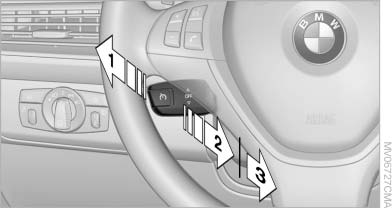
Increasing or reducing speed
1 Increasing speed
2 Pull to the resistance point: reduce the speed to approx. 4 mph/6 km/h
3 Pull beyond the resistance point: on inclines over 10 %, reduce the speed to approx.
3 mph/4 km/h
See also:
Operating from the inside
Operating from the inside
Via the button for the central locking system.
If the vehicle has been locked from inside, the
fuel filler flap remains unlocked.
If an accident of a certain severity ...
Capacity
The ski bag can be used to transport up to three
pairs of skis with a length of up to 6 ft/2.10 m or
a snowboard of up to 5 ft/1.60 m. ...
All around the headliner
All around the headliner
1
Emergency Request
2
Glass sunroof
3
Indicator lamp, front passenger airbag
4
Reading lamps
5
Interior lamps ...