
Adjusting electrically
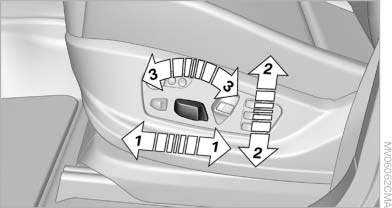
Adjusting electrically
1. Forward/backward
2. Height
3. Seat tilt
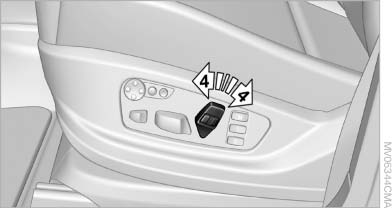
Backrest
4. Backrest
Differs depending on seat:
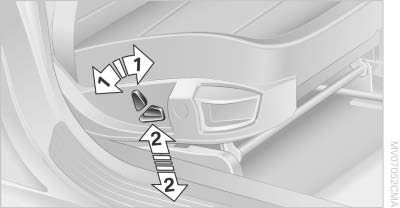
Differs depending on seat
1. Backrest
2. Height
Additional depending on seat:
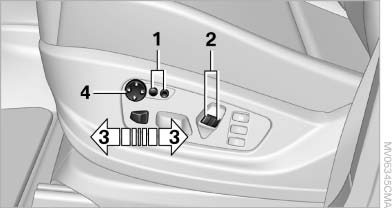
Additional depending on seat
1. Backrest width
2. Shoulder support
3. Thigh support
4. Lumbar support
Backrest width
The width of the backrest can be changed with the side wings to adjust the side support to your own needs.
Shoulder support
This also supports the back in the shoulder area, This creates a relaxed sitting position and helps relieve stress on the shoulder muscles.
The shoulder support is also used to adjust the distance of the head restraint from the back of the seat occupant's head.
Lumbar support
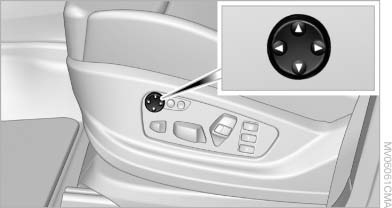
Lumbar support
You can also adjust the contour of the backrest to obtain additional support in the lumbar region.
The upper hips and spinal column receive supplementary support to help you maintain a relaxed, upright sitting position.
▷ Increase or decrease curvature:
Press front or rear section of switch.
▷ Shift curvature up or down:
Press upper or lower section of switch.
See also:
Swapping the telephone and additionaltelephone
The function of the telephone and additional telephone
can be swapped automatically.
1. "Telephone"
2. "Bluetooth® (phone)"
3. "Swap phone/addit. phone" ...
Calendar
Displaying calendarAppointments from the last 20 days and the next 50 days can be displayed.
1. "Office"
2. "Calendar"
Appointments of the current day are displayed. ...
Close the windows and glasssunroof
Driving with the glass sunroof and windows
open results in increased air resistance and
raises fuel consumption. ...