
Calendar
Displaying calendar
Appointments from the last 20 days and the next 50 days can be displayed.
1. "Office"
2. "Calendar"
Appointments of the current day are displayed.
Selecting calendar day1. Select date.
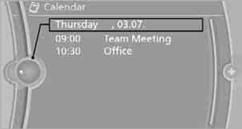
2. Select desired day or date.
> "Next day"
> "Date:"
> "Previous day"
> "Today"
1. Select the desired appointment.
2. To scroll through appointment, if necessary:
> Turn the controller.
> Select the 
 symbol.
Using contact data
Contact data from appointments, tasks, text messages, emails, and notes can be stored or selected.
Reading an appointment aloudReading an appointment aloud.
See also:
Tire identification marks
Tire size
255/50 R 19 103 Y
255: nominal width in mm
50: aspect ratio in %
R: radial tire code
19: rim diameter in inches
103: load rating, not for ZR tires
Y: speed rating, before the R on ZR ...
Opening
▷ Press the switch to the
resistance
point.
The window opens while the switch is held.
▷ Press the switch beyond the
resistance
point.
The window opens automatically.
Pressin ...