
Software update
The vehicle supports various external devices, depending on the software it is currently using. A software update can enable the vehicle to support new mobile phones or new external devices, for example.
Software updates and associated, up-to-date instructions are available on the web page www.bmwusa.com/update.
Displaying current versionThe currently installed software is displayed.
1. "Settings"
2. "Software update"
3. "Show current version"
Select the desired versionto display additional information.
Updating software by USBThe software update can only be performed when stopped.
1. Save the file for the software update in the main directory of a USB
data storage device.
2. Connect the USB data storage device to the USB interface of the USB audio
interface in the center armrest. It is not possible to perform the update using
the USB interface in the glove compartment.
3. "Settings"
4. "Software update"
5. "Update software"
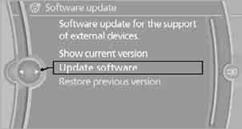
6. "USB" if applicable
7. "Start update"
8. "OK"
All of the listed software updates are installed.
Restoring to previous versionIf necessary, it is possible to restore the system to the software version prior to the last software update.
Restoring to the previous version can only be performed when stopped.
1. "Settings"
2. "Software update"
3. "Restore previous version"
4. Click "OK" twice.
All of the listed software updates are removed.
NoteBMW Assist, Office functions, and connected devices may be temporarily unavailable during a software update or while restoring to the previous version. Wait a few minutes until the functions are available once more.
See also:
Sport program DS and manual mode M/S
Activating sport program DS
Push the selector lever to the left out of transmission
position D.
DS is displayed in the instrument cluster.
The sport program of the transmission is activated. ...
Navigation system
General informationThe navigation system can determine the precise position of the vehicle, with
the aid of satellites and vehicle sensors, and can reliably guide you to every entered
destination. ...
The concept
This system issues a warning at speeds above
approx. 40 mph/65 km/h if the vehicle is about
to leave the lane on roads with lane markings.
The steering wheel begins vibrating gently. The
time o ...