
Traffic Jump
Traffic and weather information for a selected region is broadcast every few minutes.
Selecting a region1. "Radio"
2. "Satellite radio"
3. Open "Options".
4. "Set jump"
5. Select the desired region.
The region is stored for the remote control currently in use.
Activating/deactivating the jump1. "Radio"
2. "Satellite radio"
3.  "Jump to:"
Information for the selected region is broadcast as soon as it is available.
A new panel opens.
Canceling the Traffic Jump: "Cancel".
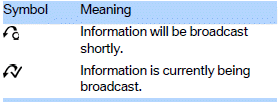
Select one of the symbols to deactivate Traffic Jump.
See also:
Starting BMW Online
1. "BMW Assist" or "ConnectedDrive"
2. "BMW Online"
Starting BMW Online
3. If necessary, "OK".
The BMW Online home page is displayed. ...
My Info
Starting destination guidance
1. Select the desired message.
2. "Start guidance" or "Add as another
destination"
Dialing the number in the message
Up to 4 phone numbers can b ...
Start/Stop button
Start/Stop button
Pressing the Start/Stop button switches the ignition
on or off and starts the engine.
The engine starts if the brake pedal is pressed
when you press the Start/Stop button. ...