
Switching the high beams on and offmanually
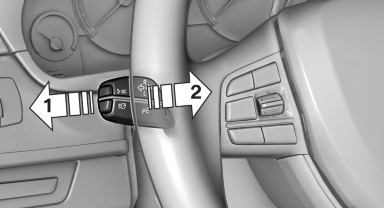
► High beams on, arrow 1.
► High beams off/headlamp flasher, arrow 2.
The High-beam Assistant can be switched off when manually adjusting the light. To reactivate the High-beam Assistant, press the button on the turn signal lever.
See also:
Reading aloud
Text messages, emails, appointments, tasks, and notes can be read aloud.
1. Select the desired message, appointment, task, or note.
2. Select the symbol.
While the message is being rea ...
Deactivating DSC: DSC OFF
When DSC is deactivated, driving stability is reduced
during acceleration and when driving in
bends.
To increase vehicle stability, activate DSC again
as soon as possible.
Deactivating DSC
...
Activating/deactivating via iDrive
1. "Settings"
2. "Lighting"
3. "High beam assistant"
High beam assistant
The setting is stored for the remote control currently
in use. ...