
Storing a channel
1. "Radio"
2. "Satellite radio"
3. Select "All channels" or a desired category.
4. Select the desired channel.
5. Press the controller again.
6. Press the controller again to confirm the highlighted channel.
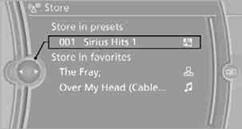
7. Select the desired memory location.
The channels are stored for the remote control currently in use.
You can also store the channels on the programmable memory keys.
See also:
BMW Info
General information
Messages from BMW regarding service actions
and news from BMW.
Selecting additional functions
The following functions are available when a
message is selected:
...
Deactivating the system
▷ When driving, press the lever up or down
twice.
▷ When stationary, do the same while depressing
the brake pedal.
▷ Switch off the ignition.
The displays go out, and the stor ...
Top-class comfort features: Bang & Olufsen High-End Surround Sound System
delivers an unparalleled audio experience.
The standard-fitted comfort-enhancing features on board the new BMW 6-Series
Coupe include 2-zone climate control, a multifunction steering wheel, electric
steering column adjustment, electrically ...