
Presets
It is possible to store up to 40 stations.
Calling up a station1. "Radio"
2. "Presets"
3. Select the desired station.
Storing a station
The station currently selected is stored.
1. "Radio"
2. "Presets"
3. "Store station"
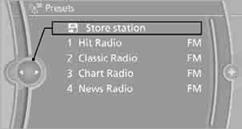
4. Select the desired memory location. The list of stored stations is stored for the remote control currently in use.
You can also store the stations on the programmable memory keys.
Deleting a station1. "Radio"
2. "Presets"
3. Select the desired station.
4. Open "Options".
5. "Delete entry"
See also:
Vehicle equipment
All standard, country-specific and optional
equipment that is offered in the model series is
described in this chapter. Therefore, equipment
is also described that is not available in a vehicle, ...
Using BMW TeleService
BMW TeleService are typically activated in the
vehicle.
Even if the BMW TeleService are not active, a
voice contact to Roadside Assistance is still
possible.
To continue using or to deactivate ...
Vehicle paint
Regular care contributes to driving safety and
value retention.
Environmental influences can act on the vehicle
paint. Tailor the frequency and extent of your car
care to these influences. ...