
Heated seats
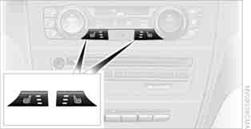
Press the button once per temperature level. Three LEDs indicate the highest temperature.
To switch off:
Press button longer.
If you continue driving within approx. the next 15 minutes, the seat heating is automatically activated at the previously set temperature.
The temperature is lowered or the heating is switched off entirely to save on battery power. The LEDs stay lit.
See also:
Even more entertainment at the wheel: with BMW Live and BMW Online
Subject to owning a suitable internet-compatible mobile phone and arranging a
requisite data tariff, new BMW 3-Series Sedan customers can enjoy a selection of
services from the existing BMW Online ...
Switching between upper and lower
case letters
Depending on the menu, you can switch between
entering upper and lower case letters:
...
Volume
▷ "Speed volume": speed-dependent volume
control.
▷ "PDC": volume of the PDC signal compared
to the entertainment sound output.
▷ "Gong": volume o ...