
Opening and closing: From inside
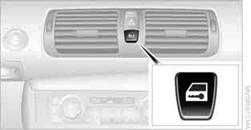
This button serves to unlock or lock doors and the trunk lid, but does not activate the anti-theft system. The fuel filler flap remains unlocked.
Automatic lockingYou can also set the situations in which the car locks:
1. "Settings"
2. "Door locks"
3. Select the desired function:
> "Lock if no door is opened"
The central locking system automatically locks the vehicle after a short time if no door has been opened.
> "Lock after start. to drive"
The central locking system locks the vehicle as soon as you begin to drive.
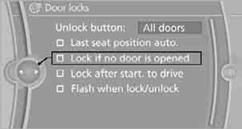
The setting is stored for the remote control currently in use.
Unlocking and opening doors> Either unlock the doors together using the button for the central locking system and then pull the door handle above the armrest or pull on the door handle of each door twice: the first time unlocks the door, the second time opens it.
Locking> Use the central locking button to lock all of the doors simultaneously, or press down the safety lock button of a door.
To prevent you from being locked out, the open driver's door cannot be locked using the lock button.
 Persons or animals in a parked vehicle could
lock the doors from the inside. You should therefore take the remote control with
you when you leave the vehicle so that the latter can be opened from outside.
Persons or animals in a parked vehicle could
lock the doors from the inside. You should therefore take the remote control with
you when you leave the vehicle so that the latter can be opened from outside.
See also:
At a glance
The concept
Mobile phones or other external devices such as
audio players can be connected to the vehicle
via Bluetooth.
After these devices are paired once, they are
recognized automatically ...
Center armrest
Storage compartmentThe center armrest between the front seats contains a credit card holder and,
depending on the equipment version, a compartment or a snap-in adapter.
Opening
Press the button, ...
Sound output
Switching on/off
When the ignition is switched off: press ON/OFF
button on the radio.
Muting
When the ignition is switched on or the engine
is running: press the ON/OFF button on the
radio. ...